


Involv: the AI-powered intranet for Microsoft 365
Your employees find what they need faster, and your communications team publishes consistent content without extra work. All AI runs within your own Microsoft 365 tenant, under your control.
See what this looks like for your organisation
Book your free demo →










What is Involv intranet AI?
Involv intranet AI is a set of AI features built into your Involv intranet. Employees ask a question in natural language and get an answer with a summary straight away. Your communications team has text drafted and rewritten, and Content Intelligence checks every day whether your intranet is still up to date. Everything runs within your own Microsoft 365 environment and you decide what gets published.
Find things faster
Ask a question in natural language. Involv AI Search looks for meaning, not just the exact words, and gives you an answer with a summary straight away.
Always up to date
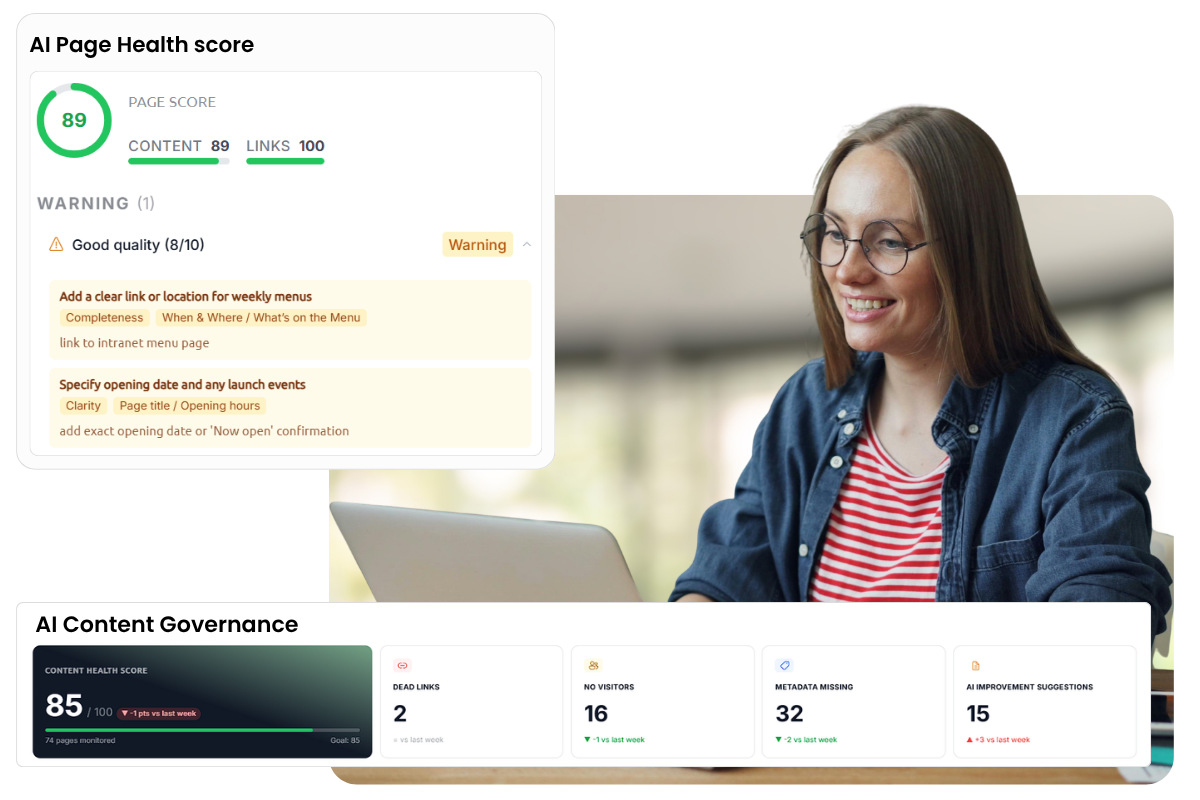
Content Intelligence checks every page daily for outdated content, broken links and missing metadata, and shows you where to start.
Respects permissions
AI works with the employee's own permissions. What someone cannot open today will not appear in an AI answer either.
In your own tenant
All features run in your own Microsoft environment. Involv hosts nothing for you and cannot see your content.
Search in natural language, the right answer straight away
Instead of searching for exact words, you simply ask a question. Involv AI Search looks for meaning: search for 'car' and you also find the vehicle policy. You get a summary of the results straight away, so you can see at a glance whether something is relevant. Less time searching, more time for the work itself.
The right answer faster, less searching
- Searches by meaning: 'car' also finds the vehicle policy
- A summary of long pages and search results, not a list of loose links
- Searches news, documents, pages and profiles all at once
- Only shows what the employee is already allowed to open

Your intranet checks itself
An intranet goes out of date quietly. Content Intelligence automatically checks every page each day and flags what needs attention. The results land in a report in your own SharePoint, so you can see right away where to start.
- Outdated content: pages that have not been updated for a long time. You decide after how many days.
- Missing metadata: pages without a title, description, department or category
- Broken links: internal and external links that no longer work
- Rarely visited pages: content to remove or bring back into the spotlight
- Quality score from 1 to 10 per page, with concrete suggestions for improvement
Write and rewrite in minutes
Give a few keywords and Involv intranet AI suggests a message in the right tone and style. Rewrite or shorten existing text in seconds. AI suggestions remain suggestions: you decide what goes live.
- From keywords to a first draft in the right tone
- Rewrite or shorten existing text in seconds
- Generate images for news items and pages (optional)

Combine AI with automatic translation
Does your organisation work in more than one language? Write your message with AI, then have it translated automatically with Involv's multilingual feature. Employees can also translate a page themselves with a button on the intranet, and right-to-left languages are supported. Plopsa uses Involv this way in parks in Belgium, the Netherlands and Germany.
AI only sees what you can already see
Involv AI works with the employee's own permissions. A document on a restricted HR site will never end up in an AI answer for someone who has no access to it, and you do not need to set up anything extra for that.
Your AI runs in your Microsoft 365, not with a third party
A fair question from every IT team: where is our data? The AI model, the processing and the storage are all in your own Azure subscription, linked to your Microsoft 365 tenant. Content that AI retrieves from SharePoint only goes to the AI model within that environment.
- Involv hosts nothing for you and cannot see your content
- You choose the Azure region where the AI model runs
- You decide where AI is switched on: for the whole intranet, or only on the search pages you choose
- Want to stop? There is no account to close at Involv and no copy of your data to delete

What is the difference between editing without AI and with Involv intranet AI?
Without AI, much of the editorial work stays manual. With Involv intranet AI that same process runs more smoothly and consistently, while you stay in control.
| Criterion | Editing without AI | With Involv intranet AI |
|---|---|---|
| Search | ✗Search on exact keywords; the result is a list of loose links | ✓Search by meaning, with a summary straight away |
| Creating content | ✗Every message from scratch; editorial time adds up | ✓From keywords to a draft in the right tone |
| Quality control | ✗Checking pages by hand; outdated content only surfaces when someone complains | ✓Content Intelligence checks every page daily |
| Access | ✗Stand-alone AI tools do not know your permission structure | ✓AI respects the existing permissions in Microsoft 365 |
| Multilingual | ✗Manual translation, copy and paste | ✓Combine with Involv's automatic translation |
| Data & security | ✓In your own tenant | ✓In your own tenant |
An intranet employees actually use


- 300+ organisations worldwide
- data in your own Microsoft 365 tenant
- one dedicated intranet team
One thing that really stands out about Involv is the little enhancements. They make things quicker, easier and more effective.
Discover how other organisations use Involv every day.
Frequently asked questions about Involv intranet AI
What is Involv intranet AI?
Involv intranet AI is a set of AI features in your Involv intranet. Employees search in natural language and get an answer with a summary straight away, editors have text drafted and rewritten, and Content Intelligence checks the quality of your intranet pages every day. Everything runs within your own Microsoft 365 environment and you decide what gets published.
Can an employee use AI to see information they do not have access to?
No. AI works with the user's own permissions. What someone cannot open today will not appear in an AI answer or summary either.
Does my data stay secure within my own environment?
Yes. The AI model, the processing and the storage are in your own Azure subscription, linked to your Microsoft 365 tenant. Involv hosts nothing for you and has no access to your content. You choose the Azure region where the AI model runs.
Is our data used to train AI models?
No. Azure OpenAI does not use customer data to train models.
Which AI model does Involv AI use?
GPT models from Azure OpenAI, in your own Azure environment. We choose the best model together with you. A smaller model costs less and is often enough.
What exactly does Content Intelligence do?
Content Intelligence automatically checks all intranet pages for outdated content, missing metadata, broken links, low traffic and quality, and gives you a report in your own SharePoint showing what needs attention. Pages that have not changed are not re-assessed by AI, which keeps a daily check affordable.
How does Involv AI Search work?
You ask a question in natural language. Involv AI Search looks for meaning across news, documents, pages and profiles, and gives you a summary of the results straight away. Search for 'car' and you also find the vehicle policy.
Do I need technical knowledge to use Involv AI?
No. Employees and editors simply use AI within the intranet: you give a few keywords or ask a question, and the AI does the groundwork. You only need an IT administrator for the installation.
What do we need to get started?
An Azure subscription and an IT administrator for the installation. We guide you through the rest.
Can we decide where AI is switched on?
Yes. Involv AI is switched off by default. You switch AI on for the whole intranet, and choose on which search pages employees get AI search. Content Intelligence is switched on separately.
What happens if we stop?
You switch AI off with a single setting and the rest of your intranet keeps working as normal. If you want to remove everything, you delete the Azure components in your own subscription. Nothing is left behind at Involv.
Does Involv intranet AI also work in SharePoint Online?
Yes. Involv intranet runs on SharePoint Online in your Microsoft 365 tenant, and the AI features work directly on your existing SharePoint content: news, documents, pages and profiles. Search in natural language works in the global search bar and in PnP Search components, and editors get content assistance right on the page.
What does Involv intranet AI cost?
Involv AI is included in the Enterprise package. On top of that there are two costs in your own Azure subscription: a limited, predictable cost for the infrastructure, and the usage of the AI model, which Microsoft bills directly. Usage depends on how much you use AI and which model you choose. You set a budget in Azure, so there are no surprises.
See Involv intranet AI in action
See in 30 minutes how AI makes your intranet smarter, tailored to your situation, with no obligations.