



YouTube will teach you how to build a SharePoint intranet in under ten minutes.
The tutorials are good. They’re clear, practical and accurate. In the time it takes to drink a coffee, you can have a communication site with a news web part, a document library and a navigation bar. Technically, it works.
What you get is what the video shows in the end, at the ten-minute mark. What it doesn’t show is month four.
Month four is when the homepage still has the news post from the launch week. When the “Quick Links” section points to a file that’s been moved. When your internal communications manager asks IT why nobody’s reading the company update – and IT says the intranet is working fine, because technically, it is.
This is the most common failure mode in DIY SharePoint intranets and it has nothing to do with the build.
We got this comment on one of our videos recently.
Honestly? He’s not wrong about the two hours. You can spin up a SharePoint site, add a news web part, and call it an intranet in less time than it takes to finish a coffee. That part is genuinely easy. What he’s asking about – those other 3 weeks, 4 days and 6 hours – is the actual job.

The field of dreams problem
“If you build it, they will come” works in baseball movies. It doesn’t work in intranets.
The assumption underneath every 10-minute tutorial is that making the intranet accessible is the hard part. Get it live, share the link, job done. Employees will find it, use it and keep coming back.
In practice, employees don’t use tools because they exist. They use tools because those tools make something easier than the alternative – email, WhatsApp, a shared drive, asking a colleague. If the intranet doesn’t deliver something employees actually need, in a format they can find and trust, they go back to whatever they were doing before.
Building a SharePoint site is a technical task. Replacing existing habits is a communication and change management task. The 10-minute tutorial only covers one of those.
What adoption actually requires
Here’s what drives ongoing intranet usage, based on watching hundreds of organisations go through launch:
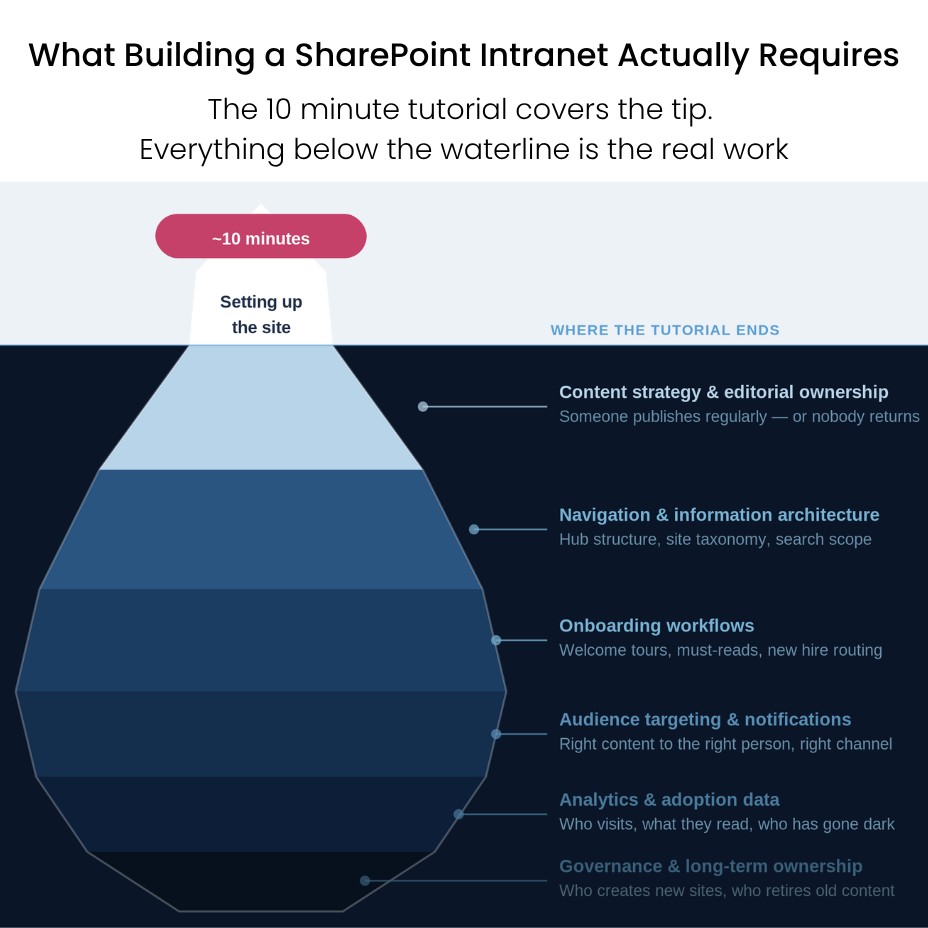
Relevant content, reliably updated. An employee who visits the intranet twice and finds nothing new stops visiting. Not out of disengagement – out of rational behaviour. If the intranet isn’t a place where things happen, it’s not a place worth checking. Content relevance requires editorial ownership: someone who treats the intranet as a publication, not a project.
Onboarding built in, not bolted on. New employees set their intranet habits in the first two weeks. If onboarding doesn’t route new hires through the intranet – a welcome tour, a must-read document, a people directory search – there’s no habit to build on. “We sent them the link” is not onboarding.
Notifications that reach people where they are. Employees don’t check the intranet unprompted. They check email, Teams, their phone. An intranet that can’t push content to those channels requires employees to form a new proactive behaviour – which most won’t. Passive “build it and they’ll check it” logic ignores how people actually consume information at work.
Audience targeting that makes content feel relevant. A manufacturing employee in Brussels doesn’t need to see the HR policy update for the London office. When the intranet surfaces everything to everyone, people mentally filter it out. When it surfaces the right content to the right people, it feels useful. Generic SharePoint news web parts don’t do this out of the box.
Analytics that tell you what’s actually happening. You can’t fix adoption you can’t see. Who’s visiting, what they’re reading, who’s not engaging at all – that data is what lets you course-correct before the intranet becomes a ghost town. SharePoint’s built-in analytics are limited; understanding adoption at a meaningful level requires additional instrumentation.
None of these are things a 10-minute tutorial gives you.
What the timeline actually looks like
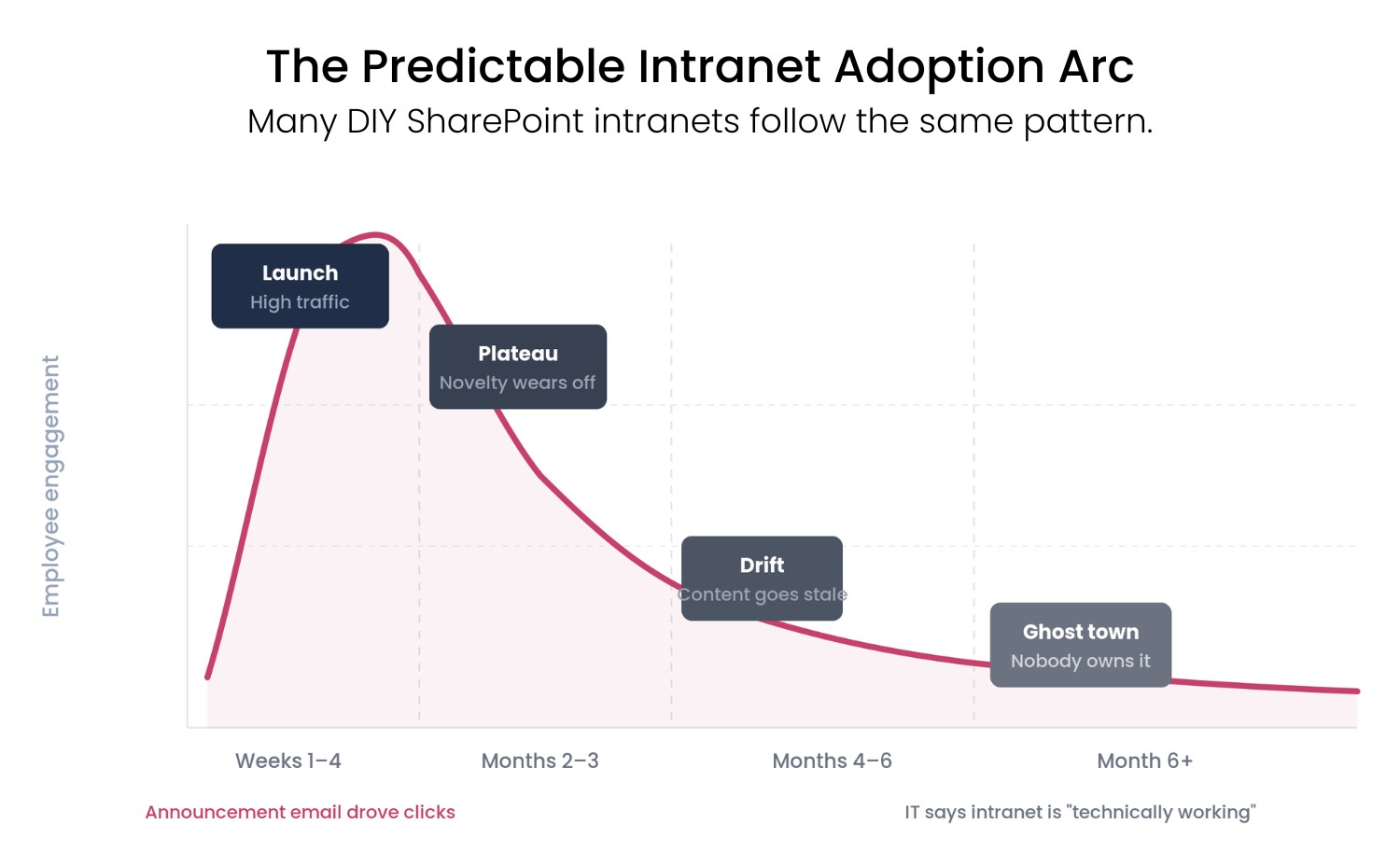
Most DIY SharePoint intranets follow a predictable arc:
Weeks 1-4 (launch): High traffic. The announcement email drove clicks. Leadership is happy. The project is declared a success.
Months 2-3 (plateau): Traffic drops. The novelty effect wears off. The editorial owner – if there was one – is back to their day job. New content slows down.
Months 4-6 (drift): The homepage looks the same as it did at launch. Employees stop going to the intranet for news because the news isn’t there. IT starts fielding questions about whether the intranet is “working properly.”
Month 6+ (ghost town): Leadership asks why the intranet investment isn’t delivering value. IT points out that the intranet is technically operational. Internal communications says they don’t have time to update it. Nobody owns the problem.
This isn’t a pessimistic prediction. It’s a pattern that repeats across organisations of every size, in every sector. The technical build is almost never the failure point. The adoption infrastructure is.
The question the tutorial doesn’t ask
Before any organisation starts a SharePoint intranet build – whether DIY or with a vendor – the adoption question needs an answer:
Who is responsible for intranet engagement, specifically?
Not IT. IT built the platform. Not “everyone.” Everyone means no one.
A real answer names a role or a person, describes what they’re accountable for and gives them the tools to do it: a content dashboard, notification capabilities, onboarding workflows, analytics to track who’s engaging.
If that answer doesn’t exist before go-live, the intranet is going to require a second launch in 12 months when the first one faded out. Most organisations have already done this once.
What this means for the build decision
If you’re evaluating whether to build on SharePoint or use a product that sits on top of it, adoption tooling should be part of that comparison – not an afterthought. (And there’s more things IT needs to understand before building a SharePoint intranet.)
Modern SharePoint Architecture: What IT Needs to Understand Before Building an Intranet
A bare SharePoint build gets you the technical foundation. It doesn’t get you the welcome tour, the mandatory read tracking, the targeted notification system, the mobile push alerts or the analytics dashboard that tell you what’s working. Those need to be built, bought, or accepted as gaps.
At Involv, adoption tooling isn’t an add-on – it’s the reason the product exists. Onboarding flows, mandatory reads, audience-targeted notifications, a mobile app with push alerts and an analytics dashboard that shows you engagement at the person level, not just the page level. These are the things that make the difference between a technically functional intranet and one that employees actually use.
But regardless of the platform decision: get the adoption question answered before you build. It’s the question that actually determines whether the intranet succeeds.
The honest summary
You can build a basic SharePoint intranet in ten minutes. The tutorial is right about that.
What takes longer – and what matters more – is building something that people use in month four and month twelve and month twenty-four. That requires content ownership, onboarding design, notification infrastructure and analytics. It requires treating the intranet as a communication channel that needs to earn attention continuously, not a project that gets declared done at launch.
The ten-minute tutorial shows you how to put up the building. It doesn’t show you how to make people want to come inside.
Want to see what Involv Intranet looks like within your own Microsoft 365 environment?