



SharePoint has changed more in the last five years than in the decade before it. If your mental model of SharePoint still involves subsites, page layouts and master pages – or if it was formed watching a tutorial from 2019 – you’re working with an outdated map.
Modern SharePoint architecture is genuinely different. It’s faster, more flexible and better integrated with the rest of Microsoft 365. It’s also less forgiving when you misunderstand the design principles behind it.
This is a ground-level overview of how modern SharePoint is structured, what the key decisions are when designing an intranet and where things tend to go wrong.
The shift from subsites to hub sites
The most important architectural change in modern SharePoint is the death of the subsite. (Microsoft Learn: Information architecture in the modern SharePoint experience)
In classic SharePoint, organisations built hierarchies by nesting subsites under parent sites – the intranet lived at /sites/intranet, HR was at /sites/intranet/hr, Finance at /sites/intranet/finance and so on. This gave you a clean URL structure and centralised administration, but it came with serious trade-offs: permissions bled down the tree, moving content was painful and the whole structure became rigid and hard to reorganise.
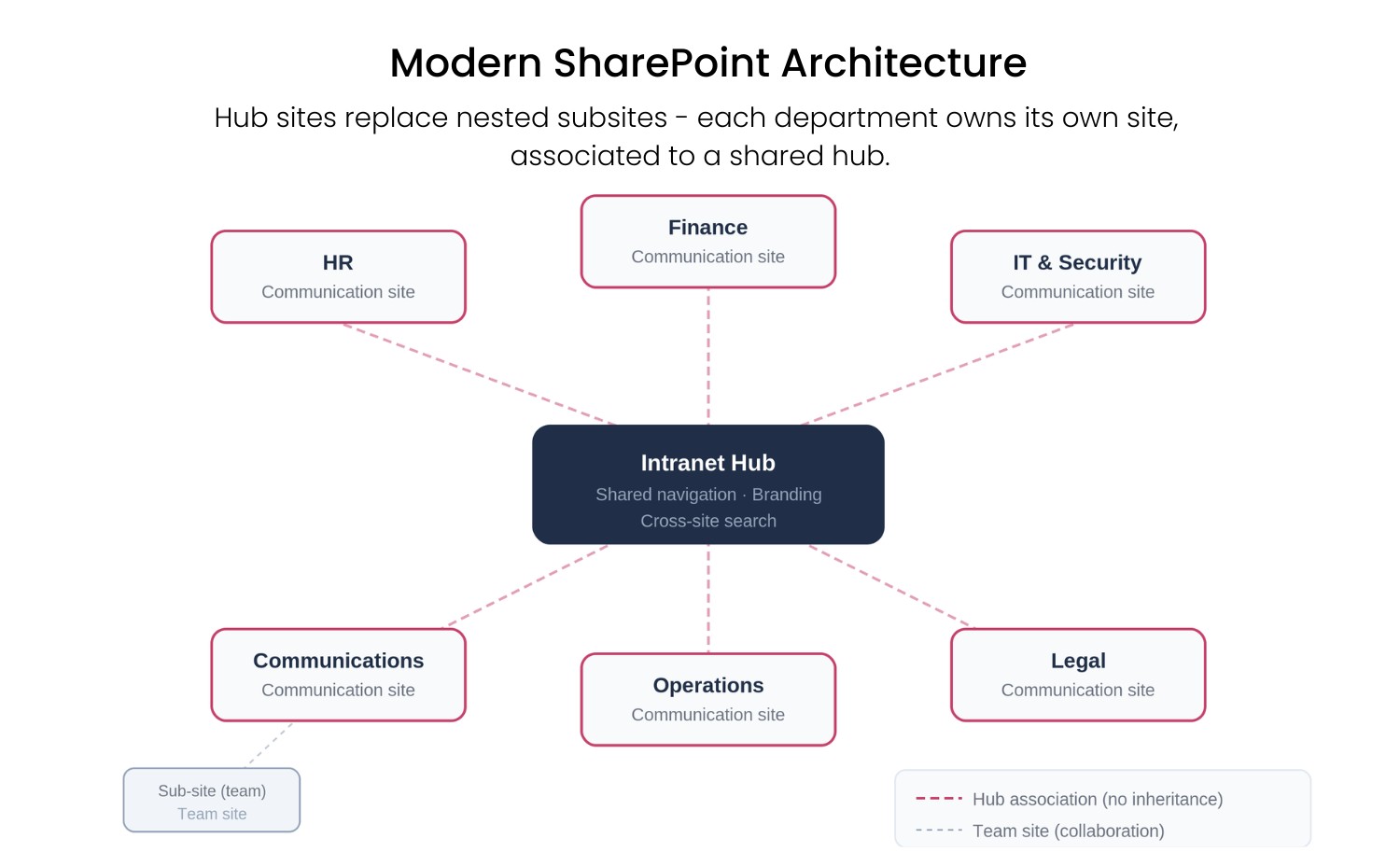
Modern SharePoint replaces this model with hub sites. Instead of nesting sites inside each other, you associate independent sites to a hub. The hub provides shared navigation, consistent branding and cross-site search – without creating an inheritance chain.
The practical implication: every department or function gets its own SharePoint site with its own lifecycle, permissions and governance. The hub stitches them together visually and for search purposes. You can reassociate a site to a different hub or remove it entirely, without touching its content.
For intranet design, this matters enormously. A well-designed hub architecture lets different teams own their own spaces while still presenting a unified experience to employees. A poorly designed one looks unified in the demo and becomes unmaintainable in production.
Key decision: How many hubs do you need? A single hub works for many organisations. Larger enterprises often need a hub hierarchy – a root intranet hub with department-level sub-hubs beneath it. Modern SharePoint supports hub-to-hub association, so you can nest hubs under other hubs without reverting to the old subsite model. Microsoft supports up to 2,000 hub sites per tenant (Microsoft Learn: Planning hub sites); the real constraint is your governance capacity to manage them.

Communication sites vs. team sites: not interchangeable
Modern SharePoint has two primary site templates. Most people know they’re different. Fewer understand when to use which.
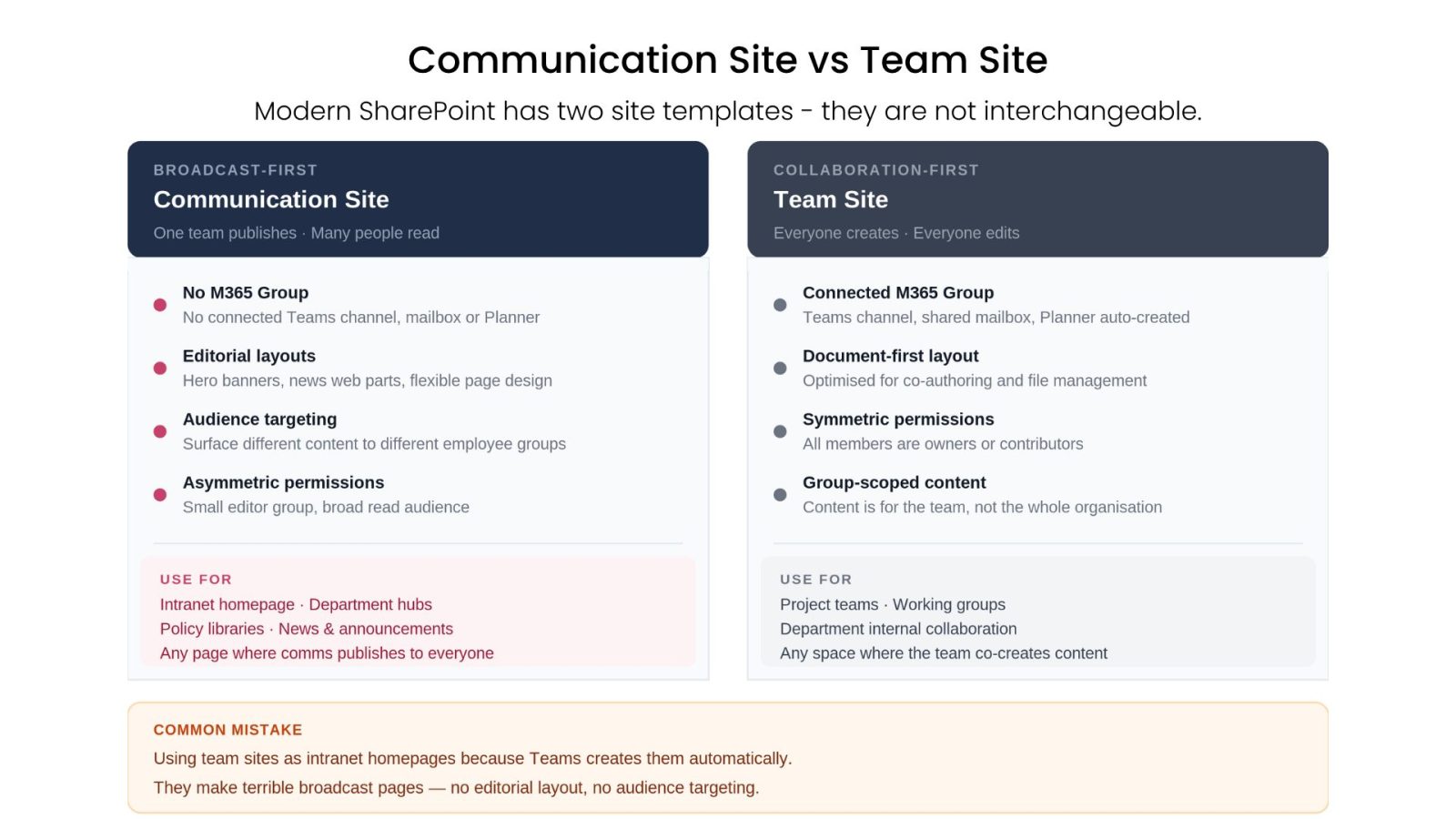
Communication sites are broadcast-first. One team publishes; many people read. They have page layouts designed for editorial content, hero banners, news web parts and audience targeting. They don’t have a connected Microsoft 365 Group. They’re for intranets, department landing pages, policy hubs and any scenario where the publisher/reader split is asymmetric.
Team sites are collaboration-first. They come with a connected M365 Group, a Teams channel, a shared mailbox, a Planner board and a SharePoint document library. They’re for project teams, working groups and functional units that need to co-create and co-manage.
The mistake most organisations make: using team sites for everything, including their intranet, because Teams creates them automatically. Team sites make terrible intranet homepages. They’re not designed for broad audiences, they don’t have the content layout flexibility of communication sites and the connected group creates permission and governance noise you don’t want for company-wide content.
Key decision: Your intranet hub and all department-facing pages should be communication sites. Team sites live alongside the intranet for collaboration; they’re not part of it.
SharePoint Framework (SPFx): the extension layer
Out-of-the-box SharePoint gives you a capable set of web parts – news, events, quick links, document libraries, people profiles. For many intranet use cases, these are sufficient.
When they’re not, the extension mechanism is SharePoint Framework (SPFx): a TypeScript-based, framework-agnostic development model for building custom web parts, extensions and application customisers that run inside SharePoint pages. SPFx supports any JavaScript framework – React, Angular, Vue.js, Handlebars and others. (Microsoft Learn: SharePoint Framework overview)
SPFx is powerful. It’s also a commitment.
Custom SPFx solutions live in the tenant app catalog. They need to be deployed, managed and updated as Microsoft evolves the platform. The SharePoint Online Workbench and the underlying FAST framework that powers modern pages get updated regularly – not on a schedule you control. Custom solutions that worked last quarter can behave unexpectedly after a platform update.
If your intranet relies on custom SPFx components, someone needs to own that surface. That means:
- Monitoring Microsoft’s SharePoint roadmap and release notes
- Testing custom components in a staging environment before tenant-wide rollout
- Maintaining the codebase as SPFx’s dependency requirements evolve
- Managing app catalog versioning when you need to roll back
None of this is insurmountable. It’s just engineering overhead that doesn’t show up in the initial build estimate.
Key decision: Before building a custom SPFx web part, check whether a standard web part or a third-party solution solves the problem. Custom development is often the right call – but it should be a deliberate choice, not the default.
The Microsoft Graph: what connects everything
Modern SharePoint doesn’t operate in isolation. It’s connected to the rest of Microsoft 365 through the Microsoft Graph – the API layer that surfaces data from Outlook, Teams, OneDrive, Entra ID, Planner and more.
This is what makes modern SharePoint intranets genuinely powerful when done well:
- The People web part pulls profile data and organisational hierarchy from Entra ID
- Audience targeting uses Entra ID group membership to personalise content – no separate user database
- My Feed aggregates signals from across M365 (documents you’ve worked on, meetings coming up, news from your followed sites)
- Viva Connections surfaces your intranet inside Microsoft Teams using the same Graph connections
Graph permissions in SharePoint are important to understand. SPFx solutions and app registrations request delegated or application-level Graph permissions. Delegated permissions mean the app can only do what the signed-in user can do – the standard and safer model. Application permissions operate independently of the user context and require more scrutiny during approval.
For any intranet solution – built or bought – knowing which Graph permissions are being requested and why, is part of a responsible IT review.
Viva Connections: the intranet-in-Teams entry point
Viva Connections is Microsoft’s answer to the question: “How do employees access the intranet if they live in Teams all day?”
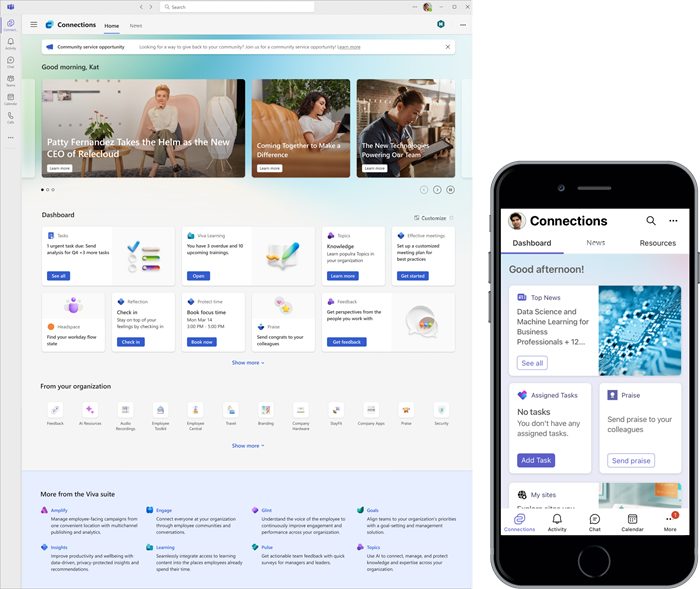
It surfaces SharePoint intranet content – a dashboard of Adaptive Card-based tiles, a news reader and resource links – accessible via Microsoft Teams, a SharePoint home site or the Viva Suite web portal. SPFx is the only supported extensibility model for Connections; if you want custom dashboard cards, they have to be built with SPFx Adaptive Card Extensions. (Microsoft Learn: Viva Connections overview)
It’s worth understanding what Viva Connections is and isn’t:
It is: A gateway. A way to surface your SharePoint intranet content across Teams, web and mobile without rebuilding anything. Useful for organisations where Teams is the primary surface for daily work.
It isn’t: An intranet. It doesn’t replace the SharePoint content layer, the governance model, the news architecture or the adoption tooling. It’s a rendering surface, not a platform.
Common mistake: treating Viva Connections as a substitute for building a proper intranet content architecture. A poorly structured SharePoint intranet surfaced through Viva Connections is still a poorly structured intranet – it’s just also in Teams.
Where products like Involv fit in this architecture
One question IT teams ask when evaluating intranet products: “Does this replace SharePoint or sit on top of it?”
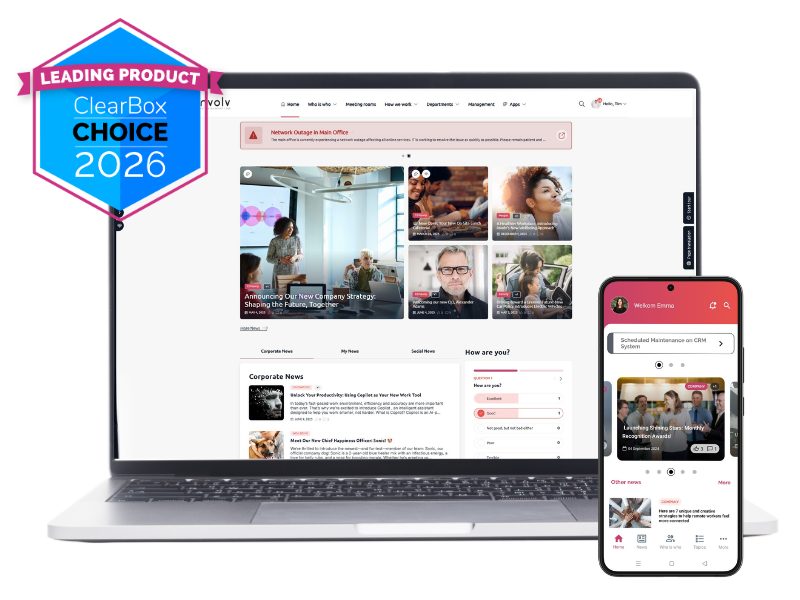
For products built on SharePoint Framework – like Involv intranet – the answer is the latter. The product deploys as SPFx packages into the tenant app catalog. It runs inside the customer’s own SharePoint environment, under existing Entra ID authentication, with delegated Graph permissions. The data lives in SharePoint lists and libraries in the customer’s tenant. There’s no separate hosting layer, no data migration, no external identity system.
The architecture is: your M365 tenant → your SharePoint sites → SPFx packages that provide the intranet layer on top.
What the product provides is the component layer (60+ pre-built, configurable intranet web parts), the governance tooling (content dashboard, approval workflows, content targeting), the mobile app and the adoption features (welcome tours, mandatory reads, push notifications, analytics) that would otherwise need to be custom-built.
IT’s role doesn’t change: you still own the SharePoint environment, the Entra ID configuration and the M365 tenant. You’re just not also building and maintaining the intranet component library.
The decisions that matter most
If you’re designing a modern SharePoint intranet architecture, these are the choices that determine the outcome:
- Hub structure: How many hubs and what’s the association model for department sites?
- Site template discipline: Are you using communication sites for broadcast content and team sites for collaboration – consistently?
- SPFx ownership: If you’re building custom components, who owns the maintenance lifecycle?
- Graph permissions: Do you understand what your solutions are requesting and why?
- Viva Connections: Are you using it as a gateway into a well-structured intranet or as a shortcut around building one?
- Adoption infrastructure: Who owns content, notifications and onboarding – and do they have the tooling to do it?
Modern SharePoint gives you an excellent foundation. What you build on it and who maintains it, still determines whether the intranet succeeds.
Want to see what Involv Intranet looks like within your own Microsoft 365 environment?