

Let me be straight with you: you can build an intranet on SharePoint. Your team probably has the skills. The platform supports it. And if your organisation is small, your requirements are simple and your IT team has capacity to spare, it might genuinely be the right call.
But I’ve spent years watching companies go through this decision – and the ones who chose DIY rarely regret starting. They regret what they didn’t see coming. So here’s what I’d tell you before you open that first SharePoint admin panel.
The build is not the hard part
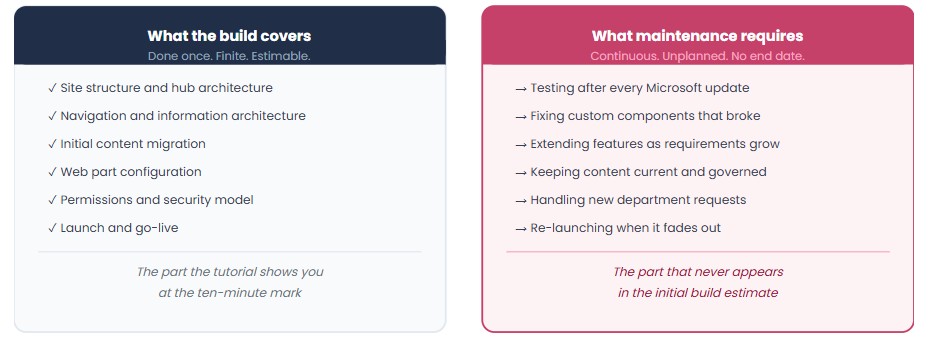
Most IT teams overestimate the build and underestimate the maintenance.
Getting a SharePoint communication site live with news, navigation, and a document library? That’s a few weeks of solid work. Maybe a couple of months if you’re setting up a proper information architecture across departments. Technically, it’s doable.
What’s harder: keeping it working after you ship it.
Microsoft pushes updates to SharePoint Online continuously. Some are cosmetic. Some break custom solutions. If you’ve built custom SharePoint Framework (SPFx) web parts – and you will, the moment your requirements get specific – each of those updates is a potential regression you need to catch, test, and fix. There’s no patch cycle you can plan around. The platform evolves on Microsoft’s schedule, not yours.
For a vendor like us, that’s a dedicated engineering function: someone evaluating every Microsoft release, checking impact against the product, and shipping a fix before customers notice. For an internal IT team, it becomes background noise that eventually turns into a critical ticket.
The question isn’t whether you can handle one update cycle. It’s whether you can handle them indefinitely, alongside everything else your team is responsible for.
Governance drift is inevitable without someone owning it
Here’s a pattern I’ve seen more times than I can count: a company builds a clean SharePoint intranet. Good structure, sensible navigation, a content governance document that someone wrote during the project.
Twelve months later, there are 40 SharePoint sites with inconsistent branding. Three different navigation patterns across departments. A news hub that hasn’t been updated since the project manager who ran the launch left. IT is fielding questions about where to find the HR policy that used to be on the homepage.
This isn’t a failure of execution. It’s what happens when governance is a project deliverable instead of an ongoing role.
A SharePoint build can produce excellent technical foundations. What it can’t produce is the editorial discipline, the content ownership model and the adoption culture that keep an intranet alive after go-live. Those things require someone – a person, with time, with accountability – to own them continuously.
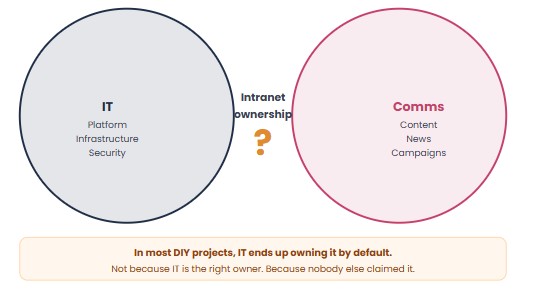
In most organisations that DIY, that person ends up being IT. Not because IT is the right owner, but because no one else claimed it.
The mobile gap nobody plans for
Ask your internal communications team, before you start the build, whether frontline employees need access to the intranet on their phones. The answer is almost always yes.
Now ask how you’re going to deliver that.
SharePoint Online has a mobile app. It works. It’s not an intranet app – it’s a document and collaboration app that can surface SharePoint pages. For organisations with mostly desk-based employees reading internal news, it’s fine. For organisations with field staff, manufacturing workers or anyone without a fixed workstation, it falls short quickly.
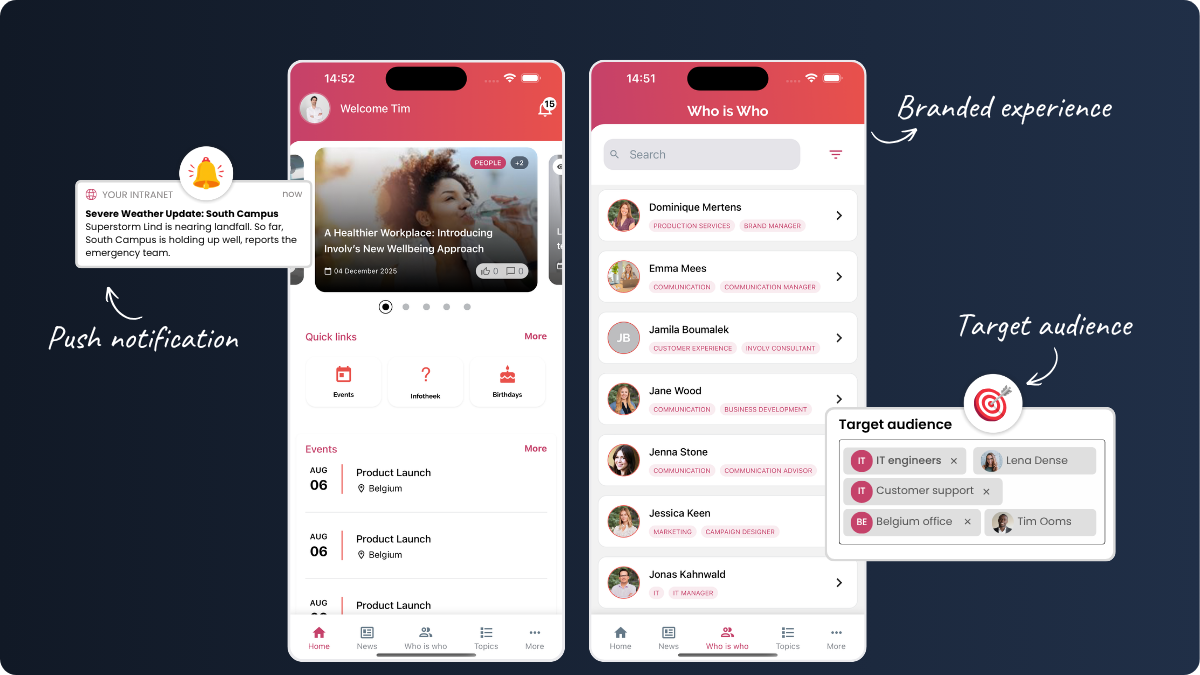
Building a proper mobile experience on top of SharePoint – push notifications, audience-targeted content, branded app experience – is a separate engineering effort, not a checkbox. It typically requires an Azure infrastructure investment and someone who can maintain it.
Most DIY intranet projects plan for the desktop and retrofit mobile later. “Later” usually means never, or a second project that costs as much as the first one.
The question nobody asks at kickoff: who owns this in two years?
This is the one I’d push hardest on before any build starts.
When the project is done, who has the skills to extend it? If the person who built the custom navigation web part leaves, who maintains it? When a department head asks for a new content type six months after launch, who scopes and delivers that? When Microsoft deprecates a feature your intranet depends on – and they will, eventually – who handles the migration?
For external consultants, the answer is uncomfortable: you call them back, pay day rates and hope they still have context on what they built. For internal teams, the answer depends on whether someone’s job description will actually include intranet maintenance after the project closes – or whether it just becomes a responsibility that lives between roles.
I’ve seen companies spend eight months building a solid SharePoint intranet and then watch it decay for two years because no one was clearly accountable for keeping it current. The build cost is a one-time line item. The ownership cost runs indefinitely.
What the timeline actually looks like
Nielsen Norman Group, which researches digital workplace implementations, found that custom SharePoint intranets typically take a minimum of 14 months to complete – often stretching into several years when scope expands and priorities shift.
That’s not a failure of ambition. It’s a reflection of how intranet projects actually unfold: requirements grow, stakeholders disagree on priorities, the initial MVP gets extended and the long tail of “we’ll finish that after launch” keeps growing.
During that time, your organisation is running on whatever you have today. Employees are searching in the wrong places. New hires are onboarding without a central resource. Internal communications is distributing information through email and Teams because the intranet isn’t ready yet.
That’s not a hypothetical cost. It’s a real one, running in the background while the build project continues.
The honest version of the build vs. buy question
I’m not going to tell you that buying is always right. For some organisations – small teams, simple requirements, strong internal SharePoint expertise and genuine IT capacity – building makes sense.
But the decision is often made on the wrong variables. Teams compare the cost of a product license against the cost of an internal build, treating internal hours as free. They don’t factor in the ongoing maintenance commitment, the governance ownership gap, the mobile requirements or the two years of organisational cost while the project runs long.
The more useful comparison is total cost of ownership over three years: build cost + maintenance + governance + the cost of the months before you go live.
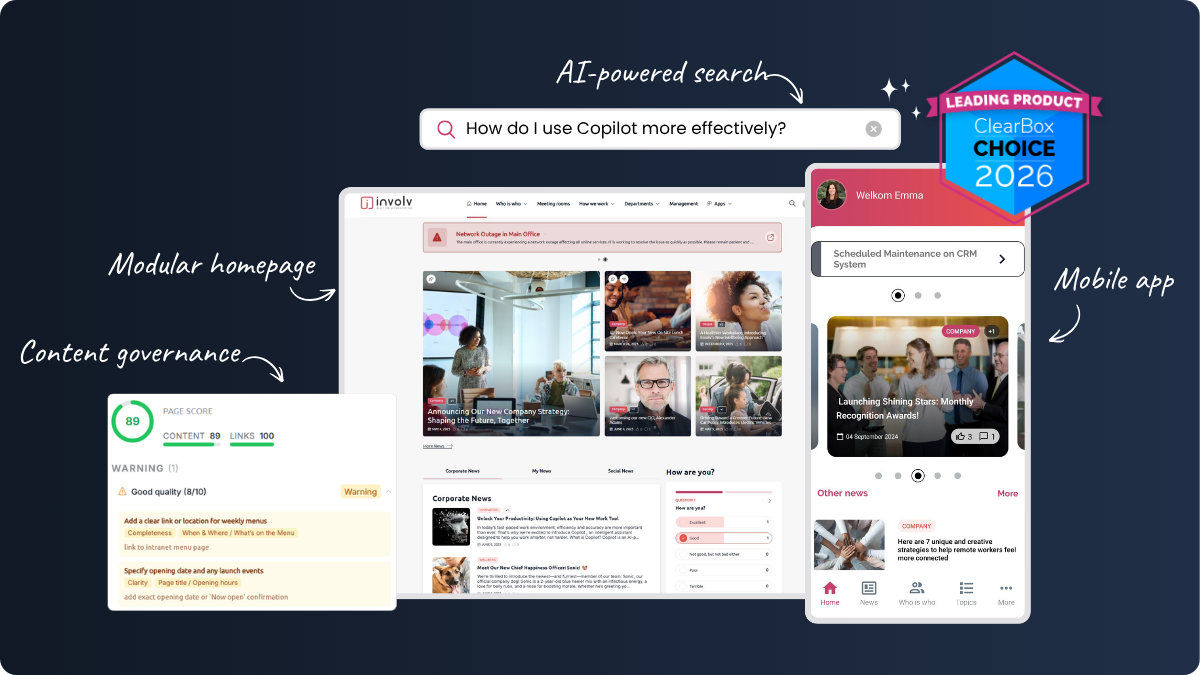
At Involv, we’ve built a product that runs entirely within your existing Microsoft 365 tenant – your data stays in your SharePoint environment, under your existing security policies, managed by your Entra ID. IT doesn’t give up control. What they get is a layer that already handles the SPFx maintenance, the mobile app, the governance tooling and the update cycles – so their team can focus on the infrastructure work that actually requires their expertise.
That’s not the right fit for every organisation. But it’s worth knowing the option exists before committing to a multi-year build project.
Before you start, ask yourself these four questions
- Who will own intranet maintenance 24 months from now, specifically? Not “the IT team” – a named person with allocated time.
- What’s your plan for mobile? Not “SharePoint has an app” – a specific answer for frontline or non-desk employees.
- How will you handle Microsoft update cycles? Who tests compatibility, and when?
- What’s your governance model after launch? Who approves new sites, maintains navigation, and owns the content structure?
If you have clear answers to all four, your DIY project has a real chance of succeeding. If any of them are “we’ll figure it out,” that’s where the cost shows up later.
Want to see what Involv Intranet looks like within your own Microsoft 365 environment?