

Creating a communication calendar isn’t just about deciding “what we post when.” It’s mainly about making sure employees get the right information at the right moment throughout the year, without drowning in scattered updates. When your calendar is solid, it creates calm and clarity – for you, your communication team and everyone in the organization. That’s why you don’t start with content, but with a clear plan: what do you want to achieve in 2026 and which themes truly deserve attention?
Start with your goals, then choose your yearly themes
Before you schedule a single post, the most important question is: what do you want to change or improve for employees in 2026? Without that starting point, a calendar quickly turns into a random list of posts that may “say something,” but don’t move anything forward.
Think of goals like: getting people on board with a new way of working, reducing recurring questions, supporting employees better in hybrid collaboration, or strengthening a specific behavior or culture theme. Once those goals are clear, making choices becomes easier. You’re no longer planning just to plan – you’re planning because you’re working toward something.
Only then do you choose your big themes for the year. Keep it simple: 2 to 4 strong anchors is usually enough. These could be themes like safety, wellbeing, innovation or strategy. With a limited number of themes, you build recognition. Employees quickly feel: “ah yes, this fits that story we already know.” And for you, it means you don’t have to start from scratch every month – you can repeat, deepen and reuse content more intelligently.
In short: goals give direction, themes give structure. Together they form the foundation of a calendar that isn’t just filled, but truly works.
Work with campaigns: short, focused and recognizable
A theme only comes alive when you grab it for a moment and make it recognizable. That’s why campaigns work best: short periods with one clear focus.
What does that look like?
-
You create one central intranet page or main article (your “base”).
-
Around that, you make short variants: a summary for Teams/Outlook, a short video, a visual…
-
Everything points back to that one core page.
Result:
One story, multiple entry points, no fragmentation.
Publish in three waves: a rhythm that sticks
Not everyone reads at the same time. So repeat your message smartly, without copy-pasting.
Think of these three steps:
-
Announcement: share what’s coming and why it’s relevant for colleagues.
-
Launch: add context, proof (case, quote, screenshot) and one clear action.
-
Follow-up: bundle questions, share results and explain what comes next.
That way everyone gets the message – even those who log in later.
Write for the task: clear, concise and human
Employees don’t want long texts. They mainly want to know: What do I need to do? Why is this relevant to me? Where do I click?
So keep your core message as simple as possible:
-
a clear title
-
one sentence with the essence
-
one concrete action at the end
Use examples only if they make that action clearer.
Choose channels deliberately: one source, multiple doors
Make your intranet the place where the full information lives. Use Teams, Outlook and the mobile app mainly to bring people there.
Content can be shorter or more visual on those channels, but: one source = less confusion.
Plan a sustainable cadence: consistency over complexity
You don’t need to start a new theme every week. A simple rhythm works best.
For example: one main theme per month
-
Week 1: teaser / announcement
-
Week 2: main content goes live
-
Week 3: activation (how-to, Q&A, short reminder)
-
Week 4: answers + preview of what’s next
Always leave room for real urgencies.
Look back briefly every month: what worked, what didn’t?
After each campaign, take a short moment to review: what worked, what should be removed, what should return? The best-performing pieces become evergreen and come back later in your planning. You build on what works instead of starting over.
Quick monthly inspiration
-
January: New Year update with a clear outlook – what does this mean for you?
-
February: make appreciation visible – compliments action or team spotlights.
-
March: learning & growth – with colleague tips.
-
April: privacy & security made tangible with familiar scenarios.
-
May: wellbeing in practice – micro-habits + low-threshold Q&A session.
-
June: sustainability from paper to practice – one action everyone can take.
-
July: smart handovers during vacation – clear handover guide.
-
August: “what you missed” – a quick guide with key links.
-
September: refresh processes – top questions answered, step by step.
-
October: cyber awareness without finger-wagging – let colleagues discover for themselves.
-
November: pulse feedback that genuinely feeds next year’s planning.
-
December: results, gratitude and a clear-eyed look ahead.
Tip: tie each idea to one explicit next step. Without action, it’s just information.
Working with Involv: from plan to publication
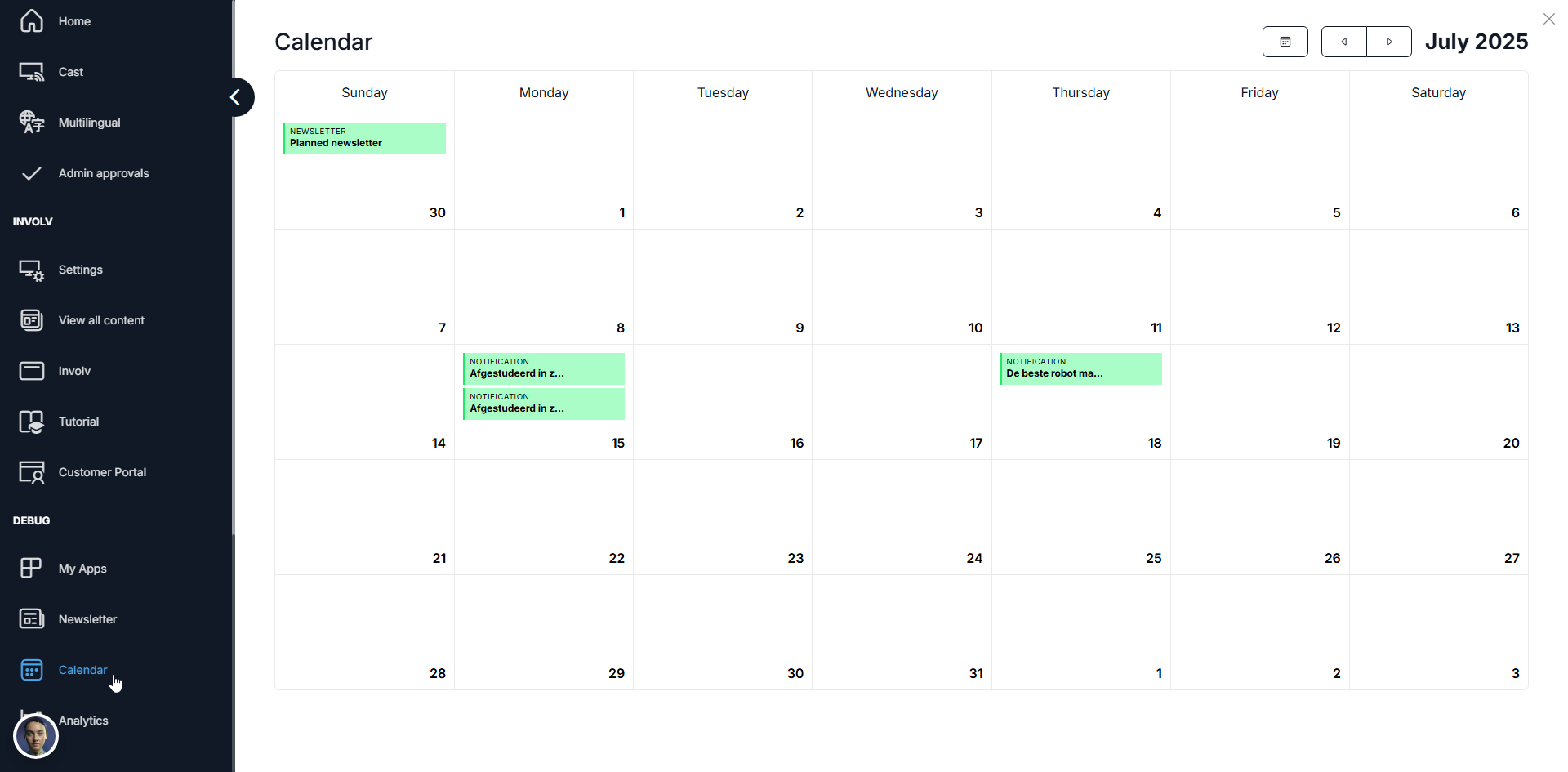
Use your intranet as the base and manage themes, owners and publication timings in the Content Calendar. Publish news via a standard process with a quality check (tone, accessibility, link check). That gives your calendar a recognizable cadence colleagues can trust.
Conclusion
A good calendar doesn’t predict the future; it provides direction. By planning from goals, working in short campaigns and publishing deliberately, you’ll get less noise and more results – the exact rhythm you want to feel in 2026.